






Product changelog
Get more Trustpilot reviews, subscription integrations, and 4 other updates
Jun 4, 2026

The team shipped six new things this week:
Get more Trustpilot & Google reviews with CSAT
Kaching Subscriptions & Stay AI integrations
Contact reasons are even more useful now
Visitor's cart shows on the sidebar
Autoclose IG/FB mentions
bunch of other smaller updates
CSAT 2.0: Send your 5-star customers straight to Trustpilot & other review sites
When a customer rates you 5 stars in a CSAT email, you can now route them straight to your review URL of choice. Trustpilot, Google reviews, Judge.me, Shopify, whatever you point us at. If they rate you 1-3 stars, you can direct them to a private feedback page so they don’t screw up your ratings.
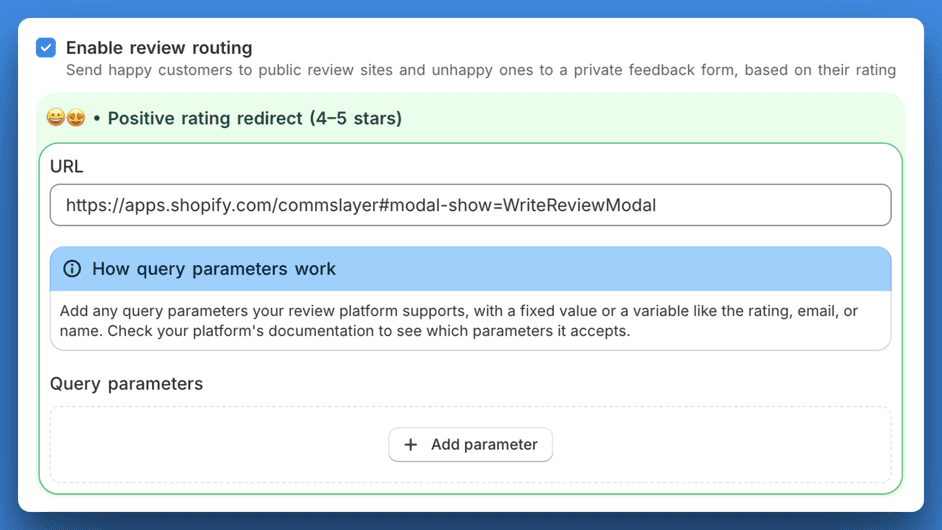
Other updates to the CSAT:
5 clickable stars inside the email body. No more "click this button to go to a survey page" graveyard
Per-inbox branding: logo + accent color so the CSAT email looks like your brand
Kaching Subscriptions & Stay AI integrations
We now integrate with Kaching Subscriptions & Stay AI! I was surprised by how many of our large accounts were already using Kaching for their subs so building an integration became a top priority item. While at it, we also added support for Stay AI.
You can connect the integrations under Settings → Integrations.
To let your AI agent manage subscriptions, go to AI agent → Actions and enable the subscription actions after connecting the integrations.
Our team has a dedicated dev working on subscriptions so expect more enhancements soon like being able to offer discounts to subscriptions as an alternative to cancelling customer’s sub. Stay tuned (lol).
Contact reasons: editable, deeper, with more reporting
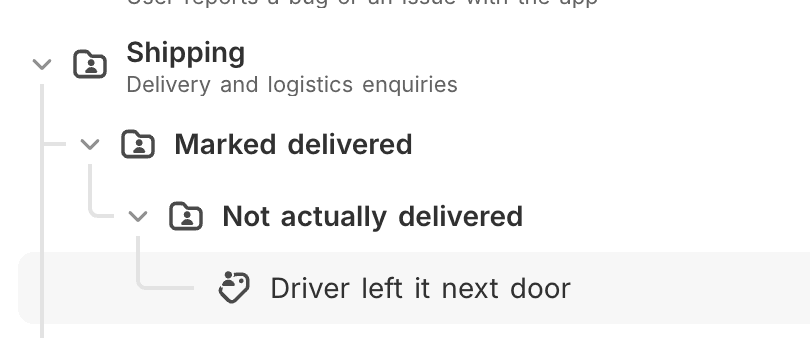
Contact reasons shipped in the last update but based on your feedback, we iterated them a bit. You can finally get run reports for things like Shipping → Marked delivered → Driver left it next door → Neighbor's dog ate it 🐶
What’s new:
Manual editing: the AI gets contact reasons mostly right, but not always. You can now edit them by hand instead of fighting the AI.
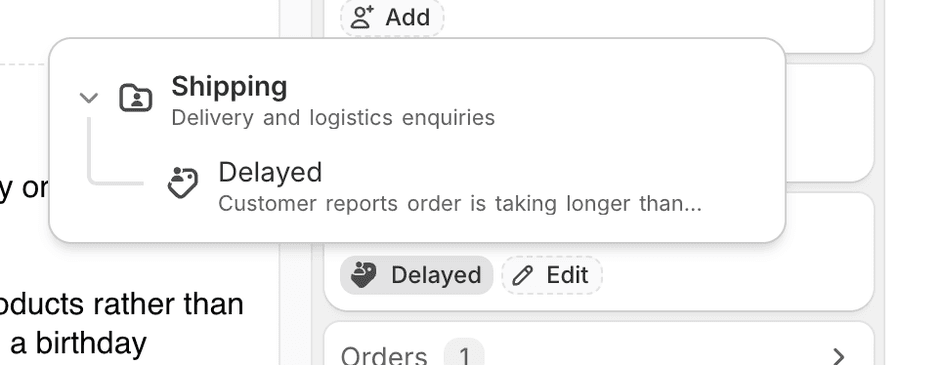
Up to 4 nesting levels: was capped at 2. Now goes 4 deep so you can model how your team thinks about categories instead of flattening everything.
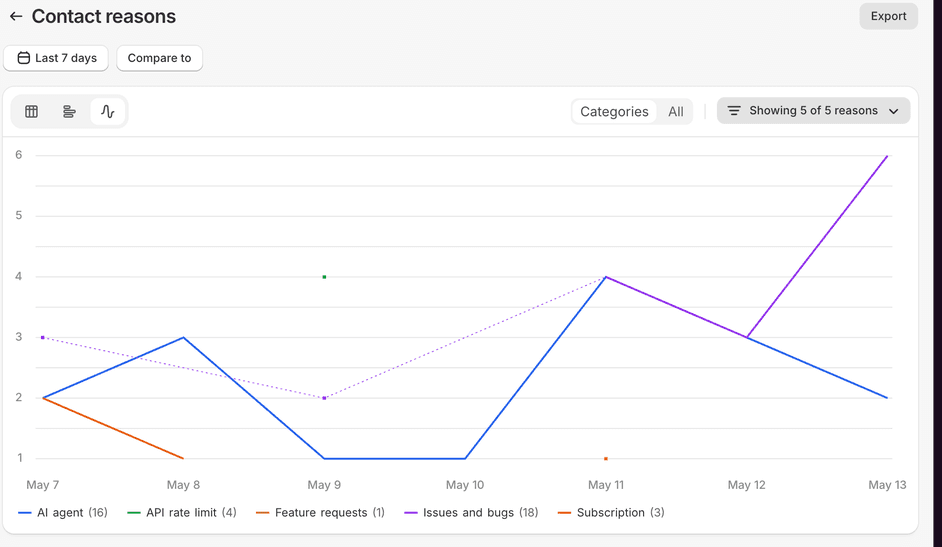
More reporting: line chart of contact reasons over time, CSV export, plus deeper breakdowns in Reports.
See customer’s cart on the sidebar
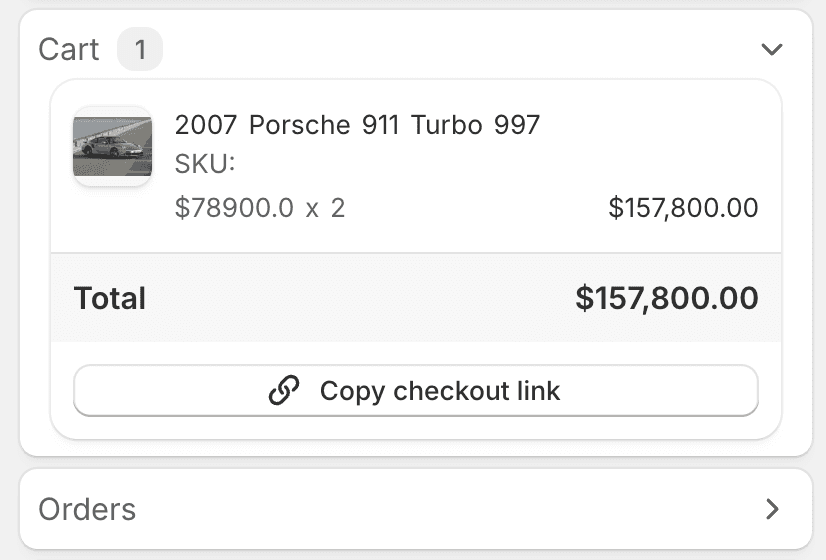
When a customer messages you, you can now see what's in their cart in the conversation sidebar. The AI agent already had access to this and your human agents can see it too now.
Autoclose Instagram and Facebook mentions
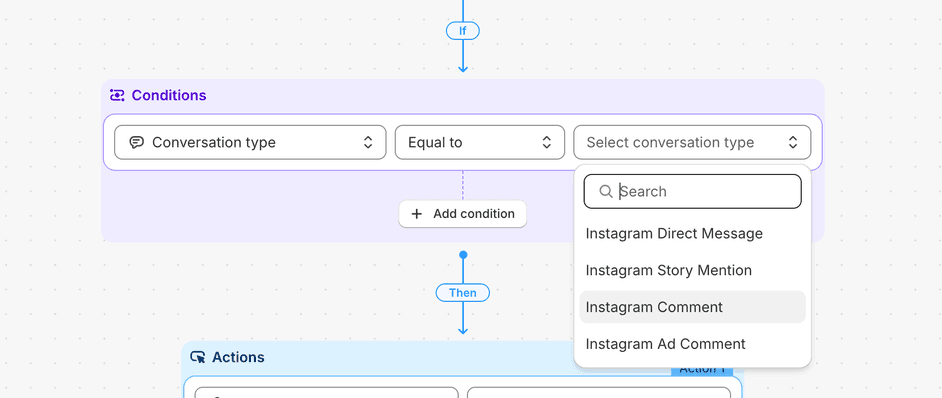
You can now build an automation that auto-resolves brand mentions, story tags, or whatever else doesn't deserve a reply. Added a "Message type" condition to automation rules (email, chat, comment, mention, DM), and it fires on conversation creation so the mention gets closed before it ever lands in your queue.
Settings → Automations → new rule → trigger: Conversation created → condition: Message type is "mention" → action: Resolve conversation.
If your social manager spends every morning resolving 30 "tagged you in their story" tickets, this is for them.
Other updates:
Two new CSMs joined our team: Nikola (ex-g*rgias) and Mitchel who will be leading our CS operations and taking care of the large accounts (Mitchel was previously with us at Lifetimely and went to Storehero. Nice to get the old band back together). We have struggled with being able to keep up with implementation requests and onboarding calls and will hopefully keep adding more CSMs throughout the year.
AI agent can now handle Judge.me reviews (check the AI agent settings)
AI agent knows which store has stock: If you run multiple Shopify locations, the agent can now see inventory per location. When someone asks whether something's in stock at a specific store, it can actually check and answer. (Requires shop reauth)
There's a "Talk to us on WhatsApp" button in the chat widget now. The customer taps it and the conversation moves to WhatsApp, with the thread intact. You can enable it in the chat inbox settngs.
Automation messages can now pull in dynamic values like the customer's first name, so your auto-replies feel less generic.
Message bubbles redesigned with a Gmail-style header on each message
Notifications got an upgrade. Activity from the same conversation groups together now, so you stop getting 8 separate pings for one ticket
Command bar (cmd + k) deserved some polishing and a new look