Automations can now wait
You’ve asked for this dozens of times: Automation delays are live.
You can now tell any automation to wait before it acts. Pick how long, and the action fires once that time passes.
Before it fires, we recheck the conversation. If anything changed while waiting, we cancel. You won’t send a “still waiting on you” nudge to someone who already replied.
A pending reminder
Set this up once and stop chasing customers by hand:
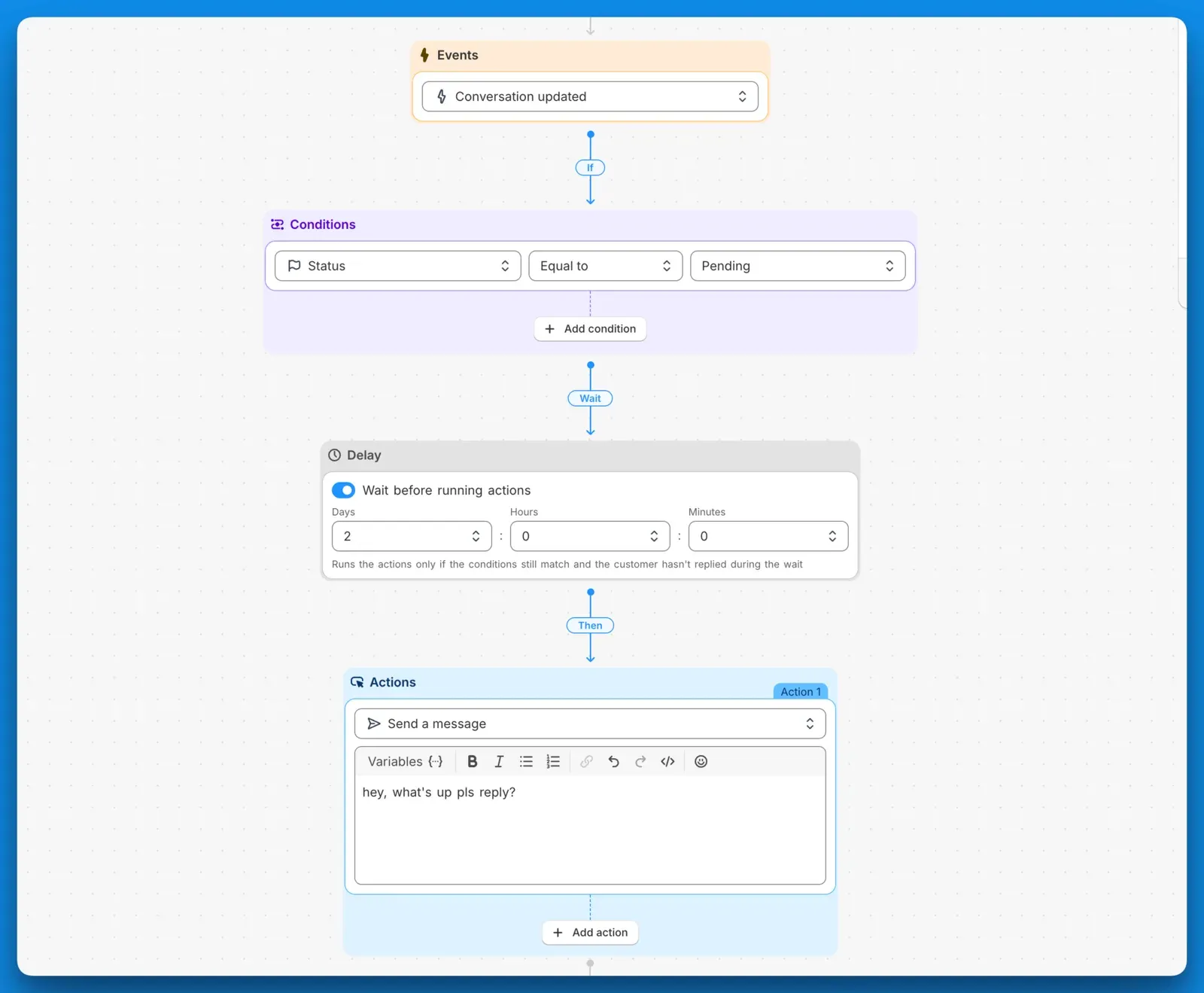
- Event: Conversation updated
- Condition: Status is Pending
- Delay: 48 hours
- Action: Send a message
If the customer replies or an agent resolves the ticket inside those 24 hours, we cancel the message. If it’s still Pending, it goes out.
If your AI agent is on with its Pending action enabled, it already sends these reminders. Use this automation for conversations where no AI agent is assigned.
Auto reopen forgotten tickets
Agents park tickets on Pending and forget to snooze them back to Open. Now you can catch those:
- Event: Conversation updated
- Condition: Status is Pending
- Pending Delay: 48 hours
- Action: Set status to Open
No more tickets lost in Pending limbo.
You’ll find Delay as a new step in the automation builder. Stack it onto any rule you already run.
Cheers, Karri